I always loved over-the-top, somewhat impractical visual effects like this. Reminds me of growing up playing with Compiz Fusion.
For a retro Android game I maintain, I use the term "Gratuitous Eye Straining Effects" in the settings page. It needs to be toggleable, because I can only tolerate it for a short period. My naming was inspired by k9mail's settings called "Gaudy visual effects". May as well have some fun with words when implementing such effects.
But Compiz Fusion wasn’t all about impractical visual effects: wobbly windows was seriously useful, and rather popular, perhaps the one thing that people would leave enabled after playing with all the fun ridiculous stuff for a bit.
When you have things that move or resize windows instantaneously, e.g. snapping to one side of the screen, the wobble in the windows was a transition, one that helped you keep track of elements rather than everything just… changing.
Seriously, so useful for floating window managers, it’s a simple and obvious form of transition, significantly better than what window managers have ended up at these days (if anything).
(Then I switched to i3, and more recently Sway. Not sure I’d appreciate wobbly windows in tiling window managers, though maybe with gaps (… which I’ve never understood the appeal of) it might be better.)
When you say "gaps", do you mean space between windows? I do that. Seeing a bit of the wallpaper is like seeing a bit of your desk between papers. Helps with mental context switching. Window borders probably serve the same function, but they've never worked as well for me.
Thanks!!! I saw the screenshot from that answer a few years ago on some blog and then tried to find it again, to no avail. Now I wrote down the URL! ;-)
I enjoy using using cool-retro-term from time to time. I don't run it for long but I do run it sometimes for the sake of nostalgia. I usually run it in full screen and increase the font size to approximate 80x24/25 terminals for an immersive experience. To balance practicality with nostalgia, I run a tmux session in cool-retro-term. It helps with conveniently switching back and forth between cool-retro-term and a regular terminal without losing the terminal session.
The terminal effects are configurable. I disable the settings named Burin, Glow Line, and RGB Shift to get a crispy and distraction-free experience. The RGB Shift setting is disabled for most built-in profiles anyway but enabled for some profiles like Vintage and IBM Dos. By the way, the Vintage profile is quite amusing. Many settings are cranked way up in this profile! The text is blurry, and the incessant flickering of the screen creates an unsettling impression that the monitor might break down any moment.
A nice little detail I like about cool-retro-term is the reflection of the screen on the glossy frame of the monitor. If we increase the Screen Curvature setting to 50% or more, we can quite clearly see the reflection of the top line or bottom line of the terminal on the frame.[1]
In case you haven't noticed it, the app is named cool-retro-term and it is abbreviated to CRT. The app icon[2] is also "CRT" written using large letters followed by a large cursor. Guess what else is abbreviated to CRT? Yes, "cathode-ray tube" of the cathode-ray tube computer monitors.
I did something like that a year ago for mine (but never published it), complete with scanlines, glow, and beam scan effect. It also handles images as well, making them monochrome, tinted, and subject to scanline bleeding as well. All in CSS so it's very fake but somewhat convincing, and probably not the most optimal way to do it (CPU is like 40% pegged)
I've also made an indie music TV project with this CRT effect and some text animation for retro terminal vibes. If you wait a bit, the ui glitches :) Fun fact, my USB-C monitor connections has a contact error and it produces a similar glitch effect.
@neom Your site looked great even before the recent css/styling from @tiborsaas , and now looks even better! Kudos! (I'm such a fan of the look-and-feel from things like Cool Retro terminal, etc.)
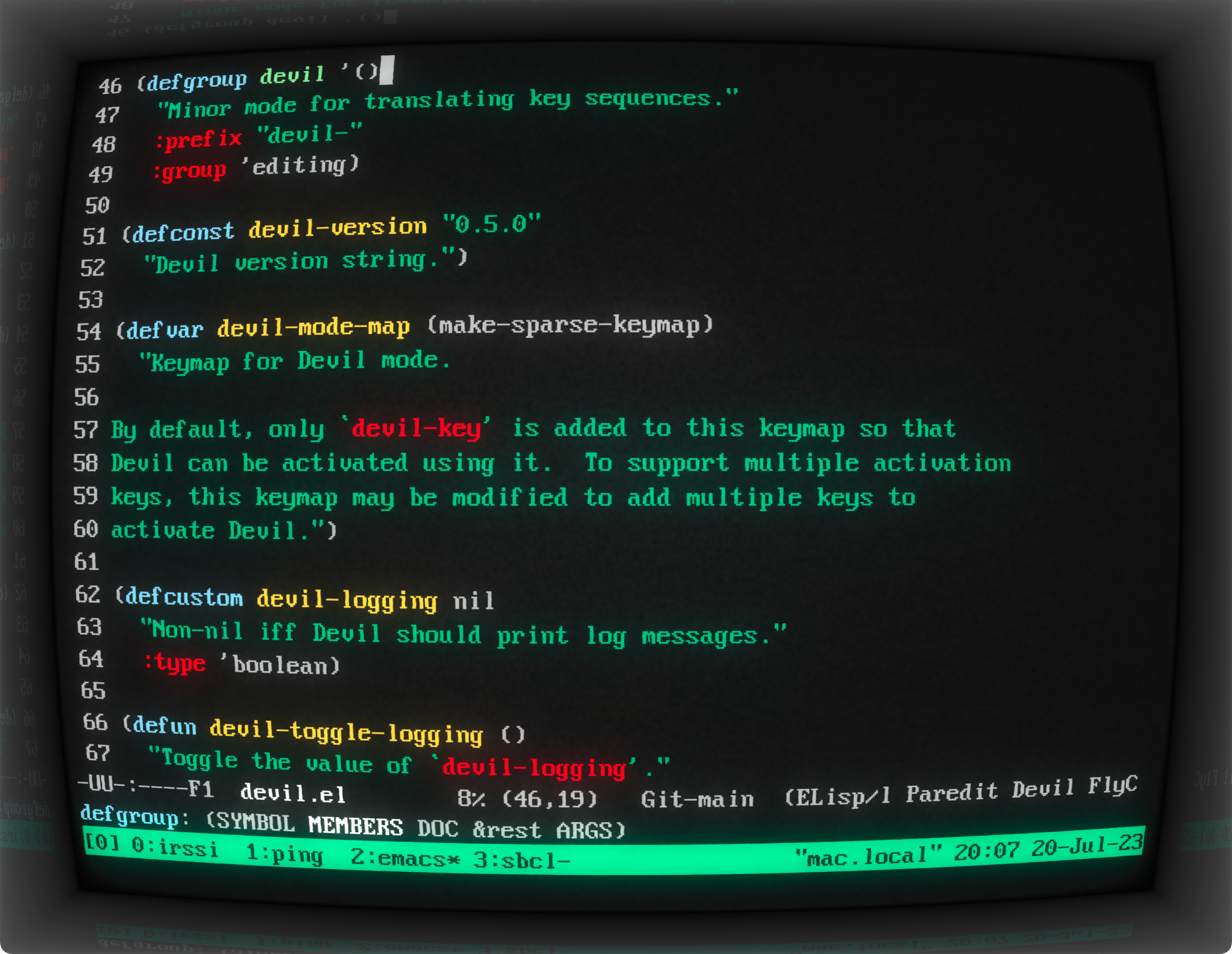
It's been a while since I've checked this program out, so this morning I downloaded it and spent some time taming some of the more extreme effects and fooling around with fonts. Pretty happy with the results! I think I got it looking pretty great[0] in GNU Emacs and Org-mode.
Admittedly the Unicode private use area icon sets look a little bit out of place in a retro terminal, so let's just call it futuristic retro terminal :)
Very cool! Windows Terminal will let you use hlsl files to define post-processing shaders so you could achieve this as a plug-in to windows terminal as well!
Yea the extent to which you can make custom terminal shaders for the Windows Terminal is pretty unbelievable. This repo has a huge collection of crazy stuff (including a better CRT one):
There's another shader floating around somewhere that includes the wraparound effect along with the phosphor effect (it can also be configured for full color support; doesn't have to be black/green)
I wonder if you could plug in some of the crt emulation shaders from retro/emulation scene to terminal... It's just pixel shaders so should be fairly feasible, maybe just some cross-compilation?
I like this terminal and have used it frequently, but it should be noted that it is a fantasy representation of how these old displays actually looked. You may be able to tone down a lot of the settings but you still wont be able to achieve that similar of a look to original displays. The monochrome displays of the time had quite clear quality. I have an Apple ii monitor from the early 80s on my desk, and the similarities are more akin to an exaggerated caricature of a celebrity. But maybe my experience doesn't go far back enough
I don't know about that. If you adjusted the "settings" of CRTs, some of the effects in Cool Retro Term would be achievable.
For those unfamiliar with CRTs, you could adjust the value of some components. These adjustments could affect things like the beam brightness, sharpness of the picture, horizontal and vertical synchronization, and geometry of the screen. Typically this was done via user accessible knobs on the front or back of the monitor, though some were only accessible after opening the case. Adjusting these knobs is better described as calibration, rather than changing settings, since you were adjusting the physical properties of components that directly altered analog signals.
Really good, but the blur/bloom seems a bit overdone. I don't remember it being that fuzzy and blurry, in the picture the blur extends half a character around each block, which is a bit excessive.
It's all adjustable, but the default profiles tend to ham it up a bit in my experience. For something I found usable, but nice to look at; all my settings were < 10%, and a few disabled (burnin, glow line, ambient light).
The effects are great! However, these feel like old-old terminals, as in terminals from 80s after decades of use. Good quality phosphor monitors are a lot crisper than the screenshots.
Can confirm. Source: the gently used VT420 on my desk that is hooked up to a RPi for retro-vibe goodness. Text is crisp and clear, no "smearing" like in the screenshots.
(Can also confirm that heavily used terminals definitely show degradation.)
VT420 must have had a good crt design. They'd run 18 hours a day as catalog terminals in university libraries with no problems. I'm sure most made 5 years with only minor brightness or contrast loss. Good solution with minimal service required--just cleaning any debris from the keyboard. Basically plug and play to the serial multiplexer.
Not retro for me! I still fondly remember the ADM-3A I used at Purdue in for 3-4 years after 1995. I would buy a working one in a heartbeat but they are kind of expensive now. Kicking myself for not snagging one when they were being thrown away by the truckload.
The recent "Silo" series on AppleTv had some nice retro-terminals. I've been trying to find better pictures or references, so if anyone has any, gladly appreciated.
Cool Retro Term is my daily driver. Though I do turn off the screen curvature (look, terminals were straight on my CRT too, they were windows there) and the burn in (just a little too excessive for me, though I haven't tried turning it most of the way down). Tools that are a joy to use are fun as well as functional.
I love this and I used it for fun occasionally. On my MacBook I also used Cathode before, but after I learned about Cool Retro Term the thought crossed my mind that the former might be a rip-off of the later. I do not wish to make any false accusations but the effects are pretty similar and maybe other commenters can confirm or dispel the suspicion.
What I am looking for since some time now is a way to create these effects in good quality in a compositor. It would be much more convenient that way. Free and open would be cool, but I'd also pay for it. Does anyone know if there is a good plugin that works with Nuke, Natron or Blender?
If you're suggesting Cathode might be ripping off Cool Retro Term, I think Cathode[1] (Jan 25, 2011) predates Cool Retro Term[2] (Nov 22, 2013) by almost three years.
Cathode was also more full-featured, e.g. I don’t think CRT has sound effects or the dying tube effect. It’s been a while and I’m not on my computer but I’m not sure it even has the bitrate modifier.
I use this a couple of times a year when I crank up my Pandas version of TOPS-20 (http://panda.trailing-edge.com/). Now that VMS is ported to x86 I may use it more!
Wow, that look brings me back. The library in the city I grew up in had monitors like that well into the 90s.
They implemented a library map on them that allowed you to zoom in to see a depiction of an atom, or out to see a depiction of the universe. Really blew my mind as a kid.
I have it installed here and rarely use it (daily driver is urxvt), but it occasionally pops up when a GUI program wants to launch a terminal and by whatever configuration mechanism they use these days prefers cool-retro-term in favor of the urxvt :)
I get the nostalgia appeal, it would be neat for a few minutes, but it doesn't seem like something you could use as your daily driver terminal. If someone has, what's your experience with it?
At the time (up through 1993), that was what we had. In open labs, there would be some jockeying for the better (newer, almost always) terminals -- a VT420 with white phosphor being the pinnacle of experiences, anything in amber usually being ranked lower than the same in green, except for one Wyse series I had mostly forgotten, where the green was eye-searingly bad with the brightness up, and muddy/blurry with the brightness down.
And then we had Linux on PCs and that was so much better nobody wanted to use the terminals again if they could avoid them.
Turn off some of the effects like the moving scan line or noise and it's fine in my experience.
Sometimes I like to have a process like htop running and easily find the window on my desktop by making it look different than other terminals--this works great for a use case like that, it's unmistakeable what terminal is running the process you want to monitor.
I remember trying this on macOS a while ago and I'm sure it had some odd quirks where things didn't work as expected which put me off using it, I'll have to try it again. There used to be a native macOS app called Cathode which was similar but it's been abandoned
I surely used actual terminals for amber and green ones, connected to the DG/UX server in one of the student labs.
Not only was something that we could use, it was quite often the only option, as the IBM X Windows thin terminals were quite often busy with people playing either dungeon like games or talk sessions, splited across 4 xterms.
That is why I don't get the CLI revivalism culture, I lived through the days it was the only option.
That's exactly the experience I had with a similar app a few years ago. It was fun for the throwback, but most of my terminal use is meant to be productive (which isn't mutually exclusive from fun), and the neat features this had become more of a distraction.
I used it a few years back but I found it crashed far too often (I use tmux so session wasn't lost but still annoying). The visual effects can also be distracting after novelty wears off and performance-wise it doesn't match something like kitty
I don't run it as a daily driver but sometimes I'll fire it up on my MBP or Chromebook for a few hours of work. I dial back a lot of the effects somewhat. I like the low-fi focus I get from using it it.
I think it's a bit overdone for a solid first impression but maybe a bit too much in the long run? Maybe if it could be toned down a bit for just a slight glow and amber warmth, haha.
I use it as my daily driver. I turn a lot of the effects down (I think the defaults are extreme) and it just looks like an old terminal emulator on a CRT used to. Feels nice.




2018: https://news.ycombinator.com/item?id=17413911
2015: https://news.ycombinator.com/item?id=9093545
2014: https://news.ycombinator.com/item?id=8399461
Someone in 2024 please continue this list