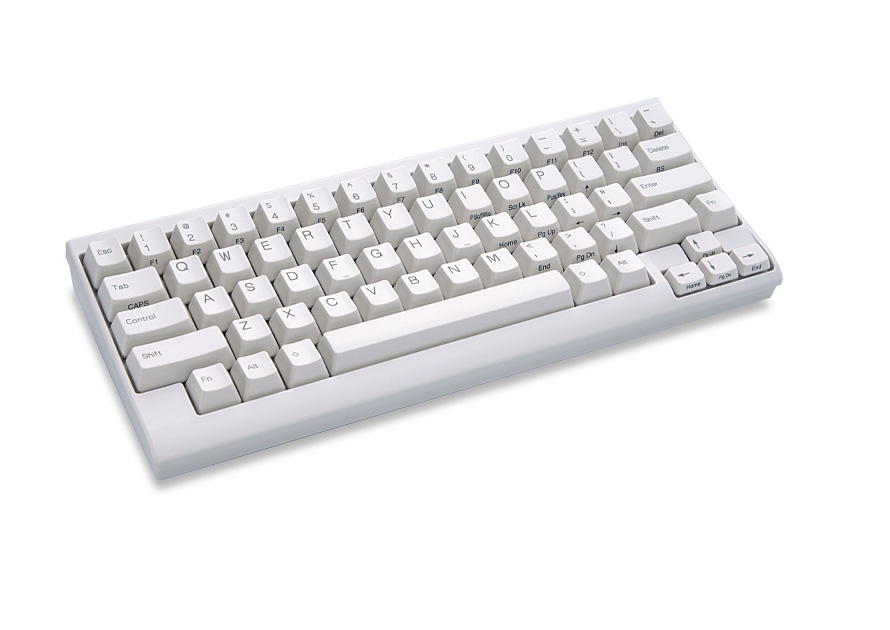
I am continually baffled by how keyboard enthusiasts almost never have ergonomic layouts. If you care this much about typing, surely the first thing you do is get an ergo layout. The rectangle layout is really bad, people! How can you spend this much time and energy and money on keyboards, and keep using the awful rectangle layout?
I've been a touch typist since I was a boy, and a programmer for more than four decades (started out on teletypes), and I've never had any kind of hand or wrist problems with normal keyboards ever. I'm choosy when it comes to keyboards though, for where I do most of my programming. Never liked the clicky ones, but what one likes is individual choice.
Looking at my hands as I write this, my wrists are not bent, or at least so little that I don't notice it. My hands are still in the normal touch type positions. Tried split keyboards (like so many other people did) but they don't do anything for me. "Normal" keyboards have the huge advantage that wherever I am (at customers, home, work, computer rooms, everywhere), there's a keyboard I can use.
I've always suspected that like airbags are mainly designed to try to save people who don't wear seatbelts properly, that ergo keyboards (split, etc) are mainly designed to try to save people without proper typing posture.
honestly kind of. I have (multiple) varied layout keyboards as swapping between them changes finger/arm/wrist levels. My finger/wrist pain (almost) went away when I started moving to a different layout every few weeks. I was worried about needing surgery before 30; now since splurging on (many) keebs my hands feel in a better shape than a decade ago.
The rectangle layout is only bad if you are a home-row typist.
The problem with home-row typing is that your wrists are bent.
It's possible to learn to type without bending your wrists. I am self-taught and have typed this way for three decades with no wrist issues due to keyboard use. My fingers rest naturally on "QWERF" and "JIOP". I actually cannot type on "ergo" keyboards due to the angles being wrong, and not being able to reach certain keys with both hands.
(I did once have wrist issues due to mouse use, about 15 years ago. This disappeared when switching to a trackball.)
Anyone who prefers "Control" next to "A" (myself included) is likely old enough to have learned to type before computer typing lessons were common, so maybe the author also is not a home-row typist.
I played piano long before I learned to type, and it's natural for me to move my hands all over the place. I've never contorted my fingers the way "correct" typists do.
In my personal experience, you avoid repetitive stress injuries by shaking up how you type. Reaching for the mouse, moving where you hold your hands. It's the old way of teaching typing with a rigid posture that causes carpal tunnel, not the rectangle frame in itself.
Ergo layouts are nice in theory but they make it harder to touch type. The modern keyboard layout is an example of a standard that works: everyone can sit down at a keyboard and start typing, even if function keys are different here or there.
EDIT: Ah, of course I am just one singer in the chorus of self-taught typists responding.
> Ergo layouts are nice in theory but they make it harder to touch type.
Because they're the exception? That's a bad rule. The only way we improve things is by creating exceptions and adopting them.
Personally, I switched to ergo keyboards 20+ years ago and I'm much happier for it. I've had to change models over the years and there was always a brief adjustment, but it was minor -- and my hands rest is such a more natural position!
How do Ergo layouts make it harder to touch type? I learnt touch typing after getting my first ergo keyboard, but I found it a transferrable skill to normal qwerty staggered keyboards with little need for adjustment. My error rate might be 1% higher on none-ergo keyboards, but otherwise I don't notice much difference.
If you're referring to the "mechanical keyboard" and similar subreddit trends, it's pretty obvious that the fascination is in the DIY and styling aspect.
It's amazing how many switches you can find today, mostly boring variations of the mx types where people post minutes-long videos of sound and smoothness when lubed.
And how it does rainbow. This is clearly what sells.
Ergonomic keyboards are a completely different market. You can't review an ergo keyboard in 5 minutes, or 5 days. The effort required to learn, and then judge the aspect of a different layout is much, much harder and time consuming. I'd argue it takes months by my own experience.
Ergonomic also means something different to each of us. For people coming in with RSI or other issues, there's no single "best" solution.
What I'm quite happy with though is that this keyboard craze has still increased the number of alternative/ergonomic layouts (and somewhat lowered the price) anyway.
I have arthritis in my hands. Switching to a super soft rubber dome did more for me than any of the tons of ergonomic layouts I tried. I poured a lot of money into the problem, including getting a Kinesis Advantage. I don't think they actually have much medical benefit at all. I think everything they achieve can be achieved by just placing your hands in a more comfortable position.
My current keyboard of choice is actually a Unix layout Sun Type 7. Keys are very easy to push but not mushy.
I also suffer from rheumatism, and I spent years (and many hundreds of dollars) trying out split keyboards before finding out that my problems had nothing to do with wrist positions. I'm now typing comfortably on a rectangular chiclet (Apple Magic) keyboard.
I tried some mechanical keyboards back in the day for the "benefits". I never got it and my hands would be strained from typing on the high travel, high resistance keys. The Apple Keyboard (I use the UK/English International) is so much easier on my hands. They're easy to find, well-supported and robust.
You are not meant to bottom out on mechanical switches, you press them until the switch actuates and then stop pressing. The advantage is that if you keep pressing a little bit after it actuates, you don't hit a hard wall. The travel distance is not that much and different switches have different resistance.
Unlike the chiclet keys, where they trigger at the bottom, so you are always bottoming out and pushing against a "wall".
Everyone has different problems though. I have no problems from hurting my fingers when typing, or carpel tunnel. But I do have messed up shoulders, and having them internally rotated all day is my biggest issue.
The biggest relief for me was a fully split keyboard so that I can have my shoulders neutral rather than rotated. Other people have no problems with their shoulders.
Most of these ergonomic things do help _someone_, I wouldn't claim that they don't work just because they don't help you.
Different people have different problems. I used Apple keyboards for years and developed wrist pains. Switched to split keyboards and things got much better since then.
There are also many mechanical switches with little travel and low force (eg. Choc v1, Kailh Super Speed).
I started having problems with my hands, and switched to a split keyboard. I used them for years, but kept having problems. Now I'm back to a rectangle, with my wrists at an angle to the keyboard, and I don't have problems. I don't think it's the keyboard shape that's the problem, but just how some people align their hands with it. I do credit the years of split keyboards with teaching me proper wrist alignment though. And after getting my fingers used to it, I'm much faster and more accurate on the rectangle. Not to mention I have a real choice when purchasing keyboards again.
I used to be a keyboard enthusiasts. I spent a lot of money on various keyboard. Then I got the Kinesis Advantage, and it completely changed me. I have now been typing on the same keyboard for 5+ years. And I probably haven't changed my layout in the last 4 years. It just works so well that I no longer see a need to "find something better".
I think it might be a result of selection bias when you see more "keyboard enthusiasts" with non ergonomic keyboard. When they find their fit with the right ergonomic keyboard/layout, they might not be that active with looking anymore.
I've wondered if I have different keyboarding posture and technique from other people.
My hands naturally sit at a 45-degree angle across the keyboard. For the most part, my wrists are straight and my fingers are lined up with the key diagonals.
I also move my arms at the shoulders while reaching for keys, so my hand comes closer to the target key and my finger doesn't move so much.
A split normal keyboard doesn't sound advantageous for me.
Maybe I could be convinced to try a split ortholinear keyboard, but a 1-piece unit sounds like a very bad match for the way I keyboard. I feel like I'd be introducing all the same problems others are trying to get away from!
EDIT: Just checked with my wife. She holds her hands in the same position, but locks them in place and does all of the reaching with her fingers.
I think that most people use more than one keyboard, at home, work, public computers, on a laptop etc.
Many of them will have a QWERTY (or the local variant) layout.
In that case you can use your super duper specialised layout on one keyboard, but every time you change to a different system you have to use the old layout again. For me that was more hassle than benefit.
Also, most people don’t even touch type, does not mean they don’t like a nice keyboard.
There is the world of ergo and/or split keyboards, which is quite fascinating, but rather expensive to `try one that best fits me`. (Ergodox EZ, Kineses advantage, OLKB splits and many more)
There is also the Alice layout, which is an interesting step towards ergonomics on a traditional keyboard.
I wish there was a keyboard club or something that let you try these out for a week or so.
Sadly printing out 2D layouts doesn't work for contoured keyboards. Switching to the contoured Kinesis Advantage was the largest improvement for me (much better than the Kyria, Ferris Sweep, Moonlander, or Keyboardio Model 100). I would've never tried the Advantage if I had used a flat keyboard comparison tool.
(Now using a Glove80, which provides benefits over the Advantage2 and doesn't have the issues of the Advantage360 Pro.)
Time for my regular rant. I've posted this in various forms over the years, with various introductions and tweaks to the wording, but the key part is always essentially the same::
> Every split keyboard with nice keyswitches has a different layout from every other, and most of them miss one or more of F keys, symmetrical meta keys, standard navigation cluster layout, volume buttons, and so on. Quite extraordinary, considering how much this type of device relies on muscle memory to work. It's like their designers want the device to be less useful, not more!
> Particularly annoying when there's such a wide range of non-split keyboards with nice keyswitches. You've got all the bizarre layouts you can eat, but you still get the option of a more standard one too.
> I wish people would just copy the MS Natural Ergonomic 4000, but with better keyswitches.
Anyway, must be 10 years since the first time I noticed what I can only describe as This Fucking Shit, and here I am still using my MS Natural 4000.
(Probably about time for my biennial keyboard hunt though. Maybe this time I'll get lucky?)
> Every split keyboard with nice keyswitches has a different layout from every other, and most of them miss one or more of F keys, symmetrical meta keys, standard navigation cluster layout, volume buttons, and so on.
Those small split keyboards generally have layouts that are more coherent and well thought out than the MS Natural Ergonomic 4000.
The design features of standard keyboard layouts are hard to justify: the spacebar takes up the space of 6 or 7 keys; which means the thumbs are only able to use one key when the hands are on home row, and the pinkies get used for many keys. The hands inevitably need to move/stretch in order to use most keys. The rest of a standard keyboard layout is asymmetrical, and the asymmetrical row-stagger makes no ergonomic sense.
The small keyboards instead almost always have 2-3 (or more) keys for each thumb.
That alone makes it much easier for the keyboard to make use of keymap layers.
It's generally also common for such keyboard users to use Home Row modifier keys; where the Alt/Win/Ctrl/Shift keys are put underneath asdf (and jkl;) keys when held. -- This is much more ergonomic than having to use pinky fingers for these keys.
On those small split keyboards, the navigation keys, volume keys, F-keys are all within reach without having to move the hands from home row (and without having to stretch fingers).
Those small split keyboards do force a trade-off, though: the benefit of reduced hand movement / finger stretching comes at the cost of a more complex keyboard layout.
I've got the Feker Alice 98 and like it very much! It's a great replacement for the old Microsoft Natural Elites I've been using for well over a decade.
What do you mean by ergo? Split? Columnar? Splayed? Sculpted?
The rectangle layout doesn't cause me issues maybe because I don't bend my wrists sharply when typing and I use a palm rest.
There is definitely a benefit to going split (less hunching of the back and shoulders) but then it can cause cramping with the pinkies. Cramping of the pinking can be solved with a columnar layout for some but by that point you are having to relearn to type.
The problem with ergonomic layouts is that they are not a one size fits all and it can get costly and time consuming to figure out what works for you.
Personally I have arrived at a Cantour Remix with a Colemak-DHm layout but even then I am only 90% happy with this setup.
Fear of losing typing speed holds a lot of people back from trying ergo layouts but from my experience it's possible to use Qwerty during the day while learning another layout on a split board at night without it impacting my Qwerty typing speed.
My hand movement is minimal with Tsangan/HHKB layout and as such, I haven't had much issue with fatigue or pain even after long stretches of typing. I find that actually, keycap profile and switch weight are bigger factors.
I do have an ai03 Meridian, which is a Alice-style board (which while not ergo is more in that direction), in the closet that I need to build though but have been putting it off because it requires soldering (hotswap has spoiled me).
I got a Unicomp model M with a trackball at the top right corner of the case and rubber dome keycaps (so I can use it at the office without annoying all my neighbors) and it's currently the longest running keyboard I've comfortably been able to use, for more than 7 years now. I had to use a gold touch 'tented' split keyboard for half a year when I was dealing with some sport induced wrist and hand issues, but otherwise a full sized keyboard hasn't cause me to develop any injury. I do appreciate that when I use the trackball my right hand cups the corner of the case and my wrist remains in a vertical position - that does feel kind of ergonomic. I have a left handed vertical mouse on my desk from around the same time I had to use the gold touch and it's a nice backup.
I did have keyboard related wrist issues in the past but it was mostly from truly bad keyboards - e.g. spent a couple of years using an Apple 'magic' keyboard. I have no interest in using a tiny reduced layout input device.
I find the big advantage of the reduced layout is that it moves the mouse/trackpad closer, reducing strain on my arm as a reach between the two.
I like the magic keyboard because it requires little effort to actuate the key and makes it easy to switch up my working position as it is so similar to the laptop keyboard.
I wish Apple would offer a combined keyboard and trackpad for desktop use that was the same as their laptops. I find being able to switch hands on the trackpad reduces strain.
I am continually baffled by how keyboard enthusiasts almost never use optimized layouts. If you care this much about typing, surely the first thing you do is get an ergo layout and then use an optimized layout such as Colemak or any of the myriad modern layout options available today. I personally use graphite (github.com/rdavison/graphite-layout), or rather, a mod of it that has an AI generated symbol layer. The Qwerty layout is really bad, people! How can you spend this much time and energy and money on keyboards, and keep using the awful Qwerty layout?
EDIT: Jokes aside, truly I wonder, for the column stagger folks who use qwerty, how do you deal with the “in” bigram? It’s one of the most common bigrams in English, and a column stagger layout usually _increases_ that distance, ie, it’s actually less ergonomic.
Just got myself a Glove80 with the linear Choc Pro Red switchtes (35gf). Glad I held off on other keyboards for this. It's so satisfying to type on. It's only been more than a couple of days and I already got the hand of it for the most part. Trying Coleman makes it even easier and I plan on being proficient on Coleman and qwerty.
The main reason I don’t stray too much from a ‘standard’ layout is that I type on a number of different keyboards in a given day, my wfh keyboard, my personal laptop, and the keyboard I have at work. If I went the ergo way I’d either have to have three, or cart one around with me, which is more hassle than it’s worth.
It's made it to the front page of Hacker News before, but I have a post about how I fell in love with the HHKB Lite back in the day (HHKB + arrow keys) [1]
After this I used a Sun layout Model-M Unicomp keyboard with classic IBM style buckling springs for a while. [2]
I used the aforementioned WhiteFox True Fox in the office, it's still there but we've been working from home since COVID started - I'll probably go collect it one day.
In the last couple years my hands started getting arthritic, and after trying a handful of ergonomic keyboards I finally settled on a Sun Type 7 [3]. The super soft rubber dome keys are the best I have used for my arthritis. They're soft, but not mushy. Really pleasant to type on. Not only that, but it looks cool but it's got the UNIX layout that I love.
I even managed to remap most of the extra left column in macOS to F13+ keys that the OS can recognize and I can use for keyboard shortcuts. I actually bought the thing from Oracle back in the day brand new. The RFQ/order process was a bit of a nightmare, they were set up to sell to major corporations, not to some dude who collects keyboards.
This seems pretty nice if you spend 100% of your computer time in a shell. For typical usage, swapping out F keys with a modifier seems like a downgrade unless you're short on space, and macros seems sorta like a workaround to address absent keys that unexpectedly become important. Also sorta unclear whether delete will go backwards or forwards, and in any case how do you delete in the other direction? (the backtick/tilde positioning seems odd at a glance but it makes sense when I think about it.)
I've definitely considered going with a more tuned layout such as this but I feel like it would just make things harder in general, with little to show for it apart from an increase in raw APM. Escape being where it is makes sense, but it's not like I find myself needing to immediately depress it to switch modes. "Escape Classic" takes a moment to reach and depress, but those moments coincide with some sort of context switch that your brain probably also needs a moment to adjust to, so it works itself out.
Much how I imagine (probably incorrectly) switching to Dvorak might make other keyboards feel alien, the rearranged keys would be a hindrance unless I carry a keyboard with me everywhere and insist on using it. It's jarring enough switching from one laptop keyboard to another, and the differences there are typically minimal.
My F-key usage is extremely low, and so layering them is no big deal. On average I think I might use layered F-keys a single-digit number of times per year. This probably has to do with the platform of choice (macOS, which favors mnemonic shortcuts over F-keys) as well as the software one uses on a day-to-day basis.
I basically never use the F keys as F keys: when I am using an Apple keyboard they default to media keys and similar stuff, which I do use. On my new keyboard I have bound (for example) fn+plus and fn+minus to adjust the volume - plus and minus are directly under the volume keys on my laptop.
The delete key deletes left when pressed by itself, or right when pressed with fn, same as Apple keyboards. Or use ctrl-d, which works in bash and emacs and all over macOS.
I have configured the macro keys to move windows to predetermined places, which is something I need far more frequently than the 39 extra keys on a full-sized keyboard.
If there were an HHKB or Tsangan layout keyboard module for Framework laptops, first party or otherwise, that'd make them significantly more appealing to me when laptop shopping. One of the main downsides of becoming a keyboard enthusiast and finding a layout that really "clicks" with you is that you're stuck with standard layouts on laptops.
For my preferred layout in QMK, I have Caps Lock mapped to Caps Lock only on tap, and Control on hold. I also have the right Alt key mapped to Backspace on tap, Alt on hold, to give me an additional backspace which I can hit with my thumb, keeping the rest of my fingers on the home row.
If you need capslock that’s easy to emulate in software nowadays. For instance KDE has a default option to toggle capslock by pressing both shift keys.
I use that, but unfortunately it's not that easy (also I'm pretty sure it's not KDE-specific - most keyboard stuff even works in the console!).
Let's use `xev`'s `state` field for reference:
First, `state & 0x10` is NumLock which is the only modifier that's often set. Software knows to mask out this and a couple other modifiers when dispatching keyboard shortcuts.
Second, `state & 0x02` is CapsLock. Software that detects CapsLock as a modifier will work correctly with double-shift-as-capslock.
Unfortunately, `state & 0x01` is Shift. Software that reads CapsLock as a keysym (often e.g. games that use it as a "turbo" toggle) will often fail, because when double-shift is pressed, the shift modifier has been set. And it's generally considered a bug to ignore modifiers when dispatching keyboard events.
Unfortunately, there is no event for just "`state` changed", it is only dispatched alongside some other mouse/keyboard event. If you press just `shift` you'll see that it doesn't update yet for the just-pressed key (and fundamentally cannot due to how it has to work to switch between keycode->keysym mappings).
I've built a few custom keyboard myself. What always stings though are the fairly limited keycap sizes that are available.
I found you need to more or less target the least common denominator among keycaps lest you find yourself pigeon-holed into one single source for your keycaps.
To that end, really wide spacebars are out — you'll either have empty real estate along the bottom row or end up adding arbitrary "filler keys" (no, my retro keyboard does not need a Windows/Command/Meta key).
I like the Control key where the author places it, but you might find it challenging finding a 1.75u CNTL key among your favorite keycap set.
Yes, the downside of this layout is that inexpensive keycap sets usually lack the necessary extras. I am brewing a followup blog post with some notes on some of the more subtle things I have learned about keycaps.
I originally went to blank keycaps to break myself of ever looking down to type, I was a decent touch typist before but doing that is “next level or bust” move.
That was years ago, but I kept it because people seem impressed by it.
It's how almost most keyboards were until the later IBM PC layout became most common in the early 90s.
Home computers from Apple, Atari, Amiga, pretty much all Unix workstations, Macs up until the late 80s, the Acorn machines. They all had Control next to A. Ok, except for the VIC-20/C64 which had it next to... Q.
Because caps-locks doesn't need prime real estate. It's barely needed. But control is used constantly, especially on Unix machines.
I've actually come to like Ctrl where it is on PCs. As it's in the corner, it's nice and easy to hit. I can sit my little finger on whichever one is convenient, then carry on typing much as normal, even using the same hand. Ctrl+Shift is also no problem.
Don't know what I'd put in caps lock's place. I don't actually think it's a particularly good location for a meta key. Maybe it'd be good for backspace? I don't really make enough mistakes for the current backspace location to be a problem.
Probably, but it's still an awful pinky stretch a gazillion times a day. I have escape on my thumb cluster. Easy to reach and utilizes the strong thumbs.
Uf. Get a keyboard with a thumb cluster and put Esc there. I use vi bindings everywhere and not putting Esc on a an easy to reach key would be terrible.
If you want to have Escape in a good position, then the far top left is a really bad position, as is having Control on the caps lock position. But then to change that you'd need to reconsider the keyboard layout itself, which seems like a too big of a mental hurdle for most people.
I don’t know of a way to get one that doesn’t involve a lot of DIY.
There are multi-layout PCBs that can support a unix69 layout, eg https://mechboards.co.uk/products/65-pcb but they all require soldering, and you also need to find a suitable multi-layout switch plate.
I designed my own PCB and enclosure, mostly for fun. I will publish it but I need to make sure the custom KiCad library footprints are committed to the right git repository…
So the difference between this and HHKB is (full size)arrow keys and left Fn? That's like 90% HHKB Lite2 which is HHKB but with left Fn, miniature arrows, cost effective membrane construction, for $50 discontinued.
My Redragon K552 has the ESC key at the upper left in line with the dedicated Fn keys. This males it easier to hit when using vi.
Beside "1" is backquote and tilde. Seems to work well.
I should get around to remapping Ctrl and CapsLock one of these days...
BTW the K552 has been able to take a lot of abuse over the years and is still working well for me, and it is not expensive. Cheaper keyboards often don't last a year with me (I learned on a manual typewriter). I think I paid $40 at MicroCenter like 2 or 3 years ago.
As noted in the linked page, this is very similar to the HHKB layout, which is far and away my personal favorite. This is also basically the layout I use on my 65% boards and is my second favorite.
I don't really have much of a need for a left Fn or physical arrow keys. In fact for the latter I find HHKB layered arrows more comfortable, especially when using the various macOS text navigation shortcuts, because it requires notably less hand movement.
I used Apple keyboards for, um, about a decade, so I am very habituated to fn on the left and arrows on the right for page up / page down / home / end.
I have bound fn + the asdf row to switch virtual desktops / spaces, and left fn is convenient for a one-handed space warp.
Yeah I must say, have got quite used to this arrangement now and this has started to feel natural to me after almost a year of using the MacBook keyboard. Kind of perfect layout for me with the full height function row with media keys and the inverted-T arrow buttons.
These things make sense to me, but I do other things with these locations.
Caps Lock is now Compose so I can write everyone's name correctly.
My GNU screen escape key is ` with `~ for a literal `. I never ever type ` because $() is the right way to do subshells. If I need to paste something with ` in it, I temporarily change this. I live in screen, even starting X11 programs from it, so this is more important than the actual Esc key!
IMO, move tilde back, get rid of escape and delete (anyone enthusiast enough to get a Unix keyboard uses ctrl-h and ctrl-[, right)?
Now we have room to do a proper fancy return key, and fit all 4 macro buttons in the top right, so we can get page up and page down back (above the right arrow key).
The lack of F keys continues to boggle my mind on these custom layouts. I need to be be able to mash F5 or F8 at a moments notice without any chording nonsense. Unless you are working from an ironing board, most desks have ample “vertical” space to extend towards the monitor with the extra keyboard row.
Perhaps they're using these keyboards on a Mac?
MacOS doesn't really use F keys. They're instead dedicated to some system-wide controls (media, volume, display brightness) by default, and you'd need to chord to use them as function keys. They're rarely assigned to anything anyway.