We had an interesting discussion about this a few nights ago at a Photojournalism talk.
In that field, digital edits are seriously banned, to the point multiple very well known photo journalists have been fired for one little use of the clone tool [1] and other minor edits.
It's interesting to think I can throw an f/1.8 lens on my DSLR and take a very shallow depth of field photo, which is OK, even though it's not very representative of what my eyes saw. If I take the photo at f/18 then use an app like the one linked, producing extremely similar results, that's banned. Fascinating what's allowed and what's not.
I find even more interesting is the allowance of changing color photos to B/W, or that almost anything that "came straight off the camera" no matter how far it strays from what your eyes saw.
When you say "digital edits are seriously banned," I think that's overreaching. I'm a former newspaper editor, and "digital edits" in the form of adjusting levels, color correction, etc., are performed on every single photo.
What's not allowed, as you allude to, is retouching a photo.
So does introducing blur after the photo was taken count as retouching, or does it fall into the same category as color correction? It's an interesting question. On the one hand, it has the potential to obscure elements of the picture, which seems like retouching, but on the other hand, you could just as easily achieve the same effect with a DSLR and there would be no outcry.
Those permitted edits you mention seem to all preserve the pixel-level integrity of the image. The fact that intentional blurring does not do this seems to be a distinction to me. I think that the fact that the blur layer must be synthesized heuristically indicates that not all of the information of the final image was really captured from the real world.
I suppose that resizing (resampling) an image might be said to not preserve the integrity of the original pixels, but I think it does if you consider the original pixels to be a reflection of the continuous field at the sensor.
Question for professionals -- how are noise reduction, masks (unsharp), etc. treated?
>Those permitted edits you mention seem to all preserve the pixel-level integrity of the image.
Curiously, you're allowed to convert color to black and white, which in my opinion is not preserving the pixel-level integrity. An algorithm is making a guess at what level of black to convert a pixel to.
> Question for professionals -- how are noise reduction, masks (unsharp), etc. treated?
I'm not a pro yet, but my understanding is it's a big no-no.
> Curiously, you're allowed to convert color to black and white, which in my opinion is not preserving the pixel-level integrity. An algorithm is making a guess at what level of black to convert a pixel to.
In the sense of pixel integrity I had in mind, a b&w conversion wouldn't be a violation. Each output pixel would be directly effected by the corresponding input pixel (Bayer interpolation notwithstanding). Image data wouldn't be moved around from one region to another.
>That's why at the start of this whole thread I reference photojournalism.
I saw it, but it's not that clear cut.
What you write, "an artistic shot to fill space" implies to me generic illustration pictures, which the above isn't an example of.
I think the restrictions to editing are mostly contrained for photos about stuff like politics, world affairs, crime etc -- stuff that is presented as 100% dry news.
But the term photojournalism covers other stuff too, right? Isn't, say, a travel article written by a journalist with a photographer photojournalism too? Or the images taken by a photojournalist for a piece on dance culture, the burning man, stuff like that. Or for a sports feature.
> But the term photojournalism covers other stuff too, right? Isn't, say, a travel article written by a journalist with a photographer photojournalism too? Or the images taken by a photojournalist for a piece on dance culture, the burning man, stuff like that. Or for a sports feature.
I agree, and as I understand it, anything beyond some basic level/color adjustments and cropping is a no-no in those areas if you want to keep your integrity.
>algorithm is making a guess at what level of black to convert a pixel to
Can you not just average the RGB values? Perhaps adjusting a bit for relative intensities of those values (I'm just guessing but red is probably less bright than blue or green). It's not really a "guess" is it unless it's a sophisticated algorithm. It's more akin to rotating or skewing an image.
Or you mean it's a guess compared to how non-colour film would actually record the light?
> the same effect with a DSLR and there would be no outcry.
I think at some point the metadata would have to set the precedent. If the image capture device were forensically examined and showed the image was taken as it, then it's untouched. If it was downloaded and blurred, then it's not untouched.
I think a similar, albiet reverse, comparison would be the iPhone's panorama function. If your cousin jumped from one end of the frame to the other, the camera's not lying. It's the person.
If the Google Camera app took the picture and the metadata prove it, the camera's not lying.
Blurring seems almost a form of cropping; in both processes image information is removed rather than added. But blurring could be more powerful and subtle since it's less constrained by the need to maintain a rectangular shape.
Removing image information can certainly be an editorial choice. Take the all-too common picture of someone being beaten in a street brawl and imagine that the photographer or editor has used cropping or blurring to remove the fact that this scene is taking place directly in front of a police station.
> I think that's overreaching. I'm a former newspaper editor, and "digital edits" in the form of adjusting levels, color correction, etc., are performed on every single photo.
Yep, sorry. I was a bit rushed when I wrote my comment. I should have said "digital edits beyond basic color correction".
Which is massively interesting, as I can walk forward effectively cropping the scene to remove (let's say) a car from the very bottom corner. I could use software to crop the image to remove the car, but if I use the clone tool to get rid of it, that's a big no-no.
The difference, in the PJ ethics sense of things, is that while the car is gone in both cases, cropping is a "lie of omission" while cloning is a "lie of commission". It's the difference between not mentioning the years 2001 through 2003 on your CV at all on the one hand and claiming you were the CEO of a now-defunct foreign company (when you were actually incarcerated) during that period on the other. (That's a bit hyperbolic, of course, but such exaggerations are differences of degree, not kind.) All journalism, no matter how "fair and balanced" you wish to paint it, is editorial and bias, but there is a big difference between editorial and fabrication. (And you don't have to zoom or "zoom with your feet" normally; cropping in post/printing is ordinarily allowed, though the editor/publisher will want to see the full frame as well. The shot you intend is not necessarily possible with the lens you have mounted - think of all of the PJ that has been done with wide primes over the years, as often as not so that "f/8 and be there" is all you need to think about. As long as the full frame is not showing your crop to be a blatant lie, like turning a dozen people in an otherwise empty city square into a massive popular demonstration, the publication will usually run with the image you intended rather than the one you captured.)
Yea I think it's ok to edit as long as it doesn't produce significant logical inconsistencies from the original (A=>B) - e.g. two missiles are turned into three; or it seemed to be late afternoon which can be made to seem nighttime from color balance (when that's significant).
Procedures like blurring shouldn't be able to cause those because like you mentioned the could have been done in situ with a camera, and they usually just lower the amount of information in the picture. That itself can change the interpretation of the scene (B=/>A), but to some extent this is inevitable -- and so acceptable if not overdone.
The edit doesn't really introduce any "logical inconsistencies", it just acts to "remove" the photographer from the scene (by way of removing his other camera), and yet it was ultimately a fire-able-offense.
The photographer, Narciso Contreras had manipulated a photo of a Syrian rebel by using a common Photoshop technique called 'cloning' in order to remove a fellow reporter's camera out of the picture, before sending it to an AP photo desk.
He removed another photographer's camera, essentially exaggerating his own ability to get pictures that other photographers cannot.
It seems to me that photojournalists in general ought to be disclosing any digital editing (especially if it is near the boundary), and it ought to be an editorial decision on the part of the publication on using the photos. The only thing that ever ought to be a firing offense (in this area!) for a photojournalist is undisclosed edits which interfere with ability to make informed editorial decisions.
On the other hand, while I agree that firing might be an extreme response, the edit in question does seriously effect the implied context of the picture. On the third hand, it does so in a way which photojournalist often seek to do through composition, so as you say, the ethics are a bit blurry -- which gets back to why I think disclosure and editorial decisions on whether and how to use photos is more important than blanket policies on edits (digital or otherwise).
Radiologists are the same... You take a Computed Tomography series of images, doing all kinds of back-projection (duh) and volumetric anisotropic edge-preserving smoothing, and then you apply segmentation and false-color, semi-transparent transfer functions and lighting...
And then you apply one more post-processing effect to try to highlight something, and they freak out that you're no longer showing them the raw data!
On a slightly related tangent, every time I see someone post a "#nofilter" photo on facebook I have to bite my tongue to stop from asking them how their camera managed to separate the RGB channels without a Bayer (or similar, eg Foveon) filter.
I mean, I sort of get what they are saying and I hate the overuse of Instagram filters probably much more than the next guy, but the odd relevance people place towards getting an image "directly out of the camera" is bizarre considering the incredible number of decisions (sometimes correctly, often not) the average digital camera has made for you in getting the measured light into a jpeg.
Personally I much prefer to shoot in RAW and then post-process because cameras, as amazing as they are in some ways, are still incredibly dumb when it comes to context and intent and I'm going to do a better job at getting the white balance, dynamic range, contrast, etc right (for how the shot was intended) than the camera is.
Regarding no filters, I've been shooting on 35mm film for the last year and been really enjoying it, almost never have to color correct, and the photos look so damn good! (especially skin tones)
I just do develop + scan at the drug store, no prints lol.
Doesn't work for everyone though, as waiting a day for photos might not be ideal (but I enjoy the anticipation heh).
That's actually massively filtered most of the time. The colour corrections are done at scan time (just as they were at print time with standard photofinishing in times past). If you were developing/printing in a home darkroom in ye olde days, you'd expect a good print on the third sheet of paper (well, the 2.25th sheet, since you'd only use a quarter-sheet for the rougher adjustments) after fiddling with filter packs or the settings on a dichroic enlarger head. (Slide shooters needed to use CC filters at shooting time.)
Digital can give you pretty much the same skin tones as you'd get with a given film (Fuji's out-of-camera JPEGs are very close to the films they're named after); it's just a matter of matching the response curve of the film you want to emulate, and that takes some fiddling that most people don't take the time to do. (Capture One has much better default conversion curves than most raw conversion software, especially where skin tones are concerned. But you can profile your camera and create your own defaults in most software.) Film does have some advantages, especially when pulled to increase its dynamic range, but it's not fundamentally better than digital, just different.
Yes, regarding the scanning, this is true... I will say though that I've tried photographing (digitally) my own negatives to see how similar it was to a drug-store scan, and it was pretty close color-wise.
However, I would have to disagree about skin tones unless you can provide some examples to sway me. I've googled a lot of comparisons and have yet to see one that looked as good. I find that the way digital captures just makes the skin look quite harsh, and reveals flaws. I personally think digital needs to make more changes to the sensor itself to really step up the quality. Foveon is an awesome example, but not fully there yet in my opinion.
It's almost certainly the other way around esp. by your description of 'harsh' skin. Likely something lossy in the film process gives the effect you like (if it is even real... it's easy to imagine all sorts of visual differences that aren't real when you know stuff)
Is the store's scan resolution decent? The last time I asked about that sort of service (a few years ago), they only offered scans at some completely awful resolution, e.g. ~1k pixels across...
I appreciate #nofilter. Color correction and enhancement is one thing, but not every selfie or food pic needs to be antiqued. Most filter usage seems to be an attempt to cover up crap lighting and careless composition with "irony".
I don't think anybody's intending for their filtered photos to be ironic. It's just aesthetics... old photos are low-fi in a way that's pleasing, while grainy blue-tinged cell phone pics are not. With one tap you can hide the latter with a filter that makes it look like the former. It's a simple thing and it's no big deal.
On the one hand, you have dodging and burning, which were often used in actual darkrooms and are still used by respected photojournalists to increase the impact of their photos. [0]
Where clumsy and obvious use of the clone tool damaged the reputation of an entire news organization.
The AP standards and practices strikes an interesting balance [1]:
  AP pictures must always tell the truth. We do not alter or digitally
  manipulate the content of a photograph in any way.

  The content of a photograph must not be altered in Photoshop or by
  any other means. No element should be digitally added to or subtracted
  from any photograph. The faces or identities of individuals must not
  be obscured by Photoshop or any other editing tool. Only retouching
  or the use of the cloning tool to eliminate dust on camera sensors
  and scratches on scanned negatives or scanned  prints are acceptable.

  Minor adjustments in Photoshop are acceptable. These include cropping,
  dodging  and burning, conversion into grayscale, and normal toning and
  color adjustments that should be limited to those minimally necessary
  for clear and accurate reproduction (analogous to the burning and
  dodging previously used in darkroom processing of images) and that
  restore the authentic nature of the photograph. Changes in density,
  contrast, color and saturation levels that substantially alter the
  original scene are not acceptable. Backgrounds should not be digitally
  blurred or eliminated by burning down or by aggressive toning. The
  removal of “red eye” from photographs is not permissible.
I'm curious to know why the AP don't allow red-eye removal--if the only manipulations allowed are those that help restore the clarity and accuracy to reality of the photographs, I'm not quite sure why red-eye removal wouldn't be permitted--most people's eyes, after all, are not red.
Sure they are red - in the brief instant the flash lights them up. You can see it with a spotlight too, try following someone around a dark stage with a spotlight.
> It's interesting to think I can throw an f/1.8 lens on my DSLR and take a very shallow depth of field photo, which is OK, even though it's not very representative of what my eyes saw
I beg to differ. Pictures with a shallow depth of field feel more real because that is how the eyes work naturally. Hold up your hand at full arms length, and focus on it with your eyes. Everything else around it is blurred.
You’re both right, to some degree. While you are correct that the eyes focus at a certain depth, much like a camera, the difference is that we can chose to focus at any depth (assuming good eyesight). This is not true of a photograph if it has no depth. (It’s also true that, if the photograph has both fore and background in focus, edges may be harder to pick out and depth harder to discern, even though we would have no trouble with our own eyes. That’s the basis of much trick photography, after all!)
All photos are unnatural. To quote the artist (and, dare I say, photographer) David Hockney: “I mean, photography is all right if you don’t mind looking at the world from the point of view of a paralyzed cyclops—for a split second.”
At risk of this becoming too long-winded, allow me to point out another “normal” variable of photography that is wholly unnatural (beyond the issue of focus and the fact that one moment is extended to infinity): Shutter speeds faster than 1/150s or slower than 0.5s. Our own eyes will never see the individual blade of a helicopter so clearly as a simple iPhone camera will when shot against a bright sky. Nor will naked eye see a waterfall as a blurry, peaceful average the way a long exposure portrays it.
Dynamic range too. Modern digital sensors are just now approaching dynamic range similar to that of the "instantaneous" dynamic range of human eyes, but as you mentioned we don't really see images instantaneous as a camera does and what we "see" (when you include brain processing) is really essentially a stack of everything we've seen up to as much as the previous 15 seconds; and when you take that into account even the best cameras are still way off on DR.
The data that the photo conveys should not be edited (i.e. the people in it, the objects in it, the framing shouldn't be used to intentially remove relevant data to the subject etc) but the mood or style of the photo may be edited. Colors, contrast, some stylistic effects, lighting, depth of field etc.
Its fairly obvious whats over the line and what isn't in 99% of cases with this.
Photojournalism is a weird cross over of history/evidence collection and drifting in to art. They fit together like oil and water, for all the reasons you pointed out.
on the other hand, i know photographers in art/advertising
-- working for some of the biggest companies, like apple --
who brag that "not one pixel goes out without being touched".
Could you speak to how familiar photojournalists are with the math and transformations that take place inside a digital camera?
For example, almost certainly your cameras have dead pixels, which are processed away during the demosaicing stage, but showing them would be a "straight off the camera image" that I doubt any photojournalist would desire.
Additionally many scene-wide process steps (like lens shading map estimation) can be changed in post-processing if the cameras automatic algorithms (3a, etc) "decided" wrong.
It sounds like the problem isn't image processing, the problem is image processing by the photojournalist, because with Photoshop in hand they can change the meaning of the photo. The best way to avoid that, is to avoid the use of Photoshop.
It’s an age old topic really, what you are doing with the camera is representing what you see, you are cropping a small part of what’s around you, and you can give something completely different meanings by just pointing the camera in a different direction.
They should make an exception for photos appearing online, since you can always link to the original one. Maybe a stipulation that the edited photos can't be used in print, unless accompanied by the original.
Regarding the technology (achieving shallow depth of field through an algorithm), not Google's specific implementation ...
Up until now, a decently shallow depth of field was pretty much only achievable in DSLR cameras (and compacts with sufficiently large sensor sizes, which typically cost as much as a DSLR). You can simulate it in Photoshop, but generally it takes a lot of work and the results aren't great. The "shallow depth of field" effect was one of the primary reasons why I bought a DSLR. (Yeah, yeah, yeah, quality of the lens and sensor are important too.) Being able to achieve a passable blur effect, even if it's imperfect, on a cellphone camera is really pretty awesome, considering the convenience factor. And if you wanted to be able to change the focus after you take the picture, you had to get a Lytro light field camera -- again, as expensive as a DSLR, but with a more limited feature set.
Regarding Google's specific implementation ...
I've got a Samsung Galaxy S4 Zoom, which hasn't yet gotten the Android 4.4 update, so I can't use the app itself to evaluate the Lens Blur feature, but based on the examples in the blog post, it's pretty good. It's clearly not indistinguishable from optical shallow depth of field, but it's not so bad that it's glaring. That you can adjust the focus after you shoot is icing on the cake, but tremendously delicious icing. The S4 Zoom is a really terrific point-and-shoot that happens to have a phone, so I'm excited to try it out. Even if I can use it in just 50% of the cases where I now lean on my DLSR, it'll save me from having to lug a bulky camera around AND be easier to share over wifi/data.
It does similar things, and in fact I could believe it if the Google app was just a dumbed down version of the functionality intended to be usable by a wider audience.
They did hire Marc Levoy. I have been hoping for this for awhile. Can't wait for the next iteration. There are certain things you can't replicate with just a single tiny camera, but they are doing a great job!
https://news.ycombinator.com/item?id=6483182
> There are certain things you can't replicate with just a single tiny camera
MOST DoF and bokeh effects in photography can't be replicated with a single small camera.
As a photographer, bokeh is surprisingly difficult to fake, and looks glaringly bad when you notice. The blur effect is due to focal distance ratio differences, and it's very difficult to determine the distance in software. Hell, it's hard to determine it with 2 lenses, as the HTC implementation does.
Look at this picture, for example: http://static.trustedreviews.com/94/00002b836/8517/blue-htc-... For most software, it's extremely difficult, even with distance data, to separate the bush in the back from the blue toy. As a result... messy looking blur.
Unfortunately, as a non-professional photographer, I think this article very disingenuous. Most of the shots aren't taken from the same distance, angle, nor lighting. "Here we are, closer to the subject and from a different angle; notice that we don't have to deal with distinguishing our focused subject from subjects that no longer exist!" "Sure these look the same, but this one is done with optics and is definitely better!"
While it is unfortunate that they did not do the exact angle in all shots, it is still possible to see the difference in the simulated and real effects.
I can say that, as a non-professional photographer, picking up a prime lens and using that for the family shots has been an extremely eye opening experience. To the point that I actually dislike most photos from point and shoots.
There is definitely a bit of "quit caring about aperture." And I can't argue against progress in making the phone cameras better. I'm just not seeing compelling evidence to ditch my DSLR.
They're clearly taken with the same lightning (outdoors and around the same time), but with different iso/aperture/exposure -- as they would have to be. The dedicated camera will let in much more light than the phone camera.
I do agree the zoom/distancing on the "foliage" photos are unfortunate for comparison -- but the fluffy animals more than make up for it IMNHO.
Very true. We do this kind of work in VFX all the time to reduce CG rendering costs for blurs that are expensive in 3d but cheap in 2d. Even with access to sub pixel (4x, 8x etc.) depth maps there are always lots of issues to deal with around edges.
But given that jpeg is good enough for most people I'm sure these types of tools are too.
According to the article, and my own experience with google's version, it's good enough for simple portraits. Since most photos, and close to 100% of photos anybody actually cares about, are portraits that makes it a pretty useful feature.
There have been multiple implementations of this class of algorithm (collectively "synthetic aperture") using different techniques.
Edit: below mentions the HTC "double camera" phones, and in fact it's also possible to create synthetic aperture photography with multiple cameras instead of moving a single camera to multiple positions. Then you have the added advantage of not needing to assume a static scene! But a single-camera algorithm is great for rolling out to the common devices most of us have in our pockets.
Marc Levoy's SynthCam used a circular wiping motion, and attempted to "paint" the 3d space occupied by your theoretical processed aperture.
This Google Camera only requires a single linear move, and processes the rest!
According to the text the blur itself is simulating an actual lens. Without seeing the exact algorithm it's hard to know how accurate that claim is. There are many ways to do a blur and I know what I'd use if I were trying to generate good bokeh.
Point taken. Arguably it's a case of David Pye's notion of the workmanship of certainty (in this case heavy-lifting computer vision) replacing the workmanship of risk (making adept movements of camera)
But if it works better under all conditions, fine.
http://en.m.wikipedia.org/wiki/David_Pye_(furniture)
The depth part is actually much easer than you might think and we've had techniques for doing some aspects of it since the 80's if not earlier.
One early technique was to take video form a mounted camera moving horizontally on weals looking 90 degrees to the side from the direction of travel (think looking out the side car window).
Now if you take that sequence of video frames and stack them one after the other like a deck of cards to create a 3d volume. Then you look down on that volume, what you will see are lines of color moving diagonally. Top left to bottom right, or the other way depending on your direction of travel.
These are the image features as they trace there way across the video over time. Things that are close move quickly so have a shallow diagonal. Things that are further away move slowly and have a much steeper diagonal.
Thanks for the explanation. I've been working a little bit with a guy doing some computer vision stuff for an industrial system (shingle production line), and I've noticed that a lot of (what seem like) complex problems can be effectively solved with very simple solutions.
Is there any simple literature that covers this domain? Like a book of algorithms for computer vision, or something?
Sadly I've found that most sources prefer to be academically rigorous over quickly comprehensible. Of course it's good that people have done the academic work, but it can be tragically comical how obtuse an academic paper can make a simple concept.
However, one of the most recommended books on the subject is available online, so you might want to check that out.
Computer Vision: Algorithms and Applications by Richard Szeliski
re: your first comment... I'm reminded of a lot of the wikipedia pages on mathematical concepts. Sometimes I have to laugh, because they seem so high-level that only someone who already understood the domain could understand them.
One limitation of this that nobody has mentioned yet is that if you have to pan your cameraphone as you are taking the photos to generate the depth map you will have a harder time composing your photo than you would with a traditional photo. Usually I like to spend a few seconds getting into the best position and framing my photo carefully before taking it. Getting the photo I wanted would therefore be much harder if I had to pan the camera around as I was taking it. I don't have Android so can't test it out... anyone using the app got any views on this?
You first take the picture normally. After taking the picture it asks you to slowly move the camera up to generate the depth of field, so there's no moving the camera as you're taking it
It would seem that if you have to do a depth scan anyway, it should be possible to just do a (series of) scan(s), and then post-compose and post-focus your image(s)?
Half a sec on my N5 (go slower and it actually complains). It's even shorter with good lightning and with a bit of habit it can come out quite naturally. Frame, snap, slide.
I would say that it takes about 1 second on my nexus 4. If you do it too fast the app will complain, but I find that it's actually very fast and easy to do right.
It still seems like a problem to me, if your subject (and potentially background) are moving around a lot. I shoot a lot of macro shots of bugs that are always about to jump off plants that are swaying in the wind... Not to say this tech isn't impressive and useful, but it doesn't solve DoF problems for tiny cameras in every situation.
Not endorsing this thread or anything, but getting that film to Instagram is trivial: it's called Costco. They'll develop that film, print it, scan it for you and give you digital files. Easy, cheap and high quality.
The point is, it's not difficult at all, and the optics setup to do so is actually much simpler than the computational algorithms needed to do it digitally. To think that an expensive DSLR or complex PGM algorithm is required to do so is silly. People have been shooting narrow DOF pictures for most of the past century.
Now to get smartphones to do it is perhaps harder than running out to the store and getting a camera, but I would characterize this as one of those evolutionary rather than revolutionary improvements.
In terms of digitizing, there's this archaic thing called a scanner, but a lightbox/DSLR rig can do it, but with the rise of full frame/narrow/mirrorless bodies from Fuji and Sony, you might not even need to do that anymore...
> Up until now, a decently shallow depth of field was pretty much only achievable in DSLR cameras (and compacts with sufficiently large sensor sizes, which typically cost as much as a DSLR
In 2008, I had no trouble taking shallow-depth-of-field photos with a dirt-cheap Canon A570 pocket camera. For example:
Depth of field increases as the focus point moves deeper into the frame.
Depth of field decreases as your lens length increases.
Depth of field decreases as your sensor size increases.
The A570 will have a relatively large sensor compared to a mobile phone, and your subject was very close to the lens. These things considered, the depth of field isn't impressively shallow. Reducing the sensor size to that of a phone and moving the subject further away will make shallow depth of field impossible. The portrait examples on that Google page are exactly the sort of thing that wouldn't have been possible previously.
It's not so much that a DSLR is the only way to shoot with a shallow depth of field (which can even be achieved on a phone camera if you're taking a picture of a ladybug a few inches from the lens), but that the greater the aperture and/or sensor size, the further away you can get a shallow depth of field. So on an APS-C sensor with an f/1.8 lens, you can shoot a portrait with the same level of bokeh you might only get with an extreme macro on a pocket camera, and on a full-frame sensor with an f/1.2 lens, your subject might be standing many feet away and you could still achieve the same effect.
I'm pretty sure they definitely don't count, as DOF is a ratio of focusing distance IIRC. Also the DOF would be far more shallow with a DSLR and a fast lens in the same conditions (close focus).
The method at least is very different. The Google app is doing structure from motion, which essentially uses parallax to get the 3D shape of the scene. From there, you can blur/deblur according to depth. The Nokia app uses focal sweep, i.e. it just takes lots of pictures of the same scene focussed at different depths. I'm not sure what the pros and cons of each approach are.
I only used Google version but I would guess that:
Nokia:
- Nokia approach requires better lens with low aperture, because shallow DOF is done physically not using algorithm
- Refocus on Nokia seems to be super fast, because they just change the picture which is used
Google
- can use any lens, as bokeh is just calculated
- you can change parameters of bokeh (very shallow DOF or not so much)
- it requires a lot of computational power, so it take a lot of time to modify the photo
The Nokia app requires a longer exposure time, encompassing multiple shots, which basically means that anything moving is a no-go. The quality of its pictures is theoretically superior, though, because the depth effect comes from the photos themselves, and not a simulation.
Google's version, on the other hand, works with only a single photo, so it's more versatile. It may suffer issues with quality, though (arising from the difficulties in accurately extracting depth values from a 2D image). That has yet to be seen.
That is not true, Google version requires you to take a photo for several seconds while slowly moving phone upwards. Both methods take probably same amount of time.
Yes, I'm sure they just saw this on Nokia a couple of months back and were like "OH SHIT! We gotta do this NAO!". And then just 2 months later, behold - a perfect clone of Nokia's software (with stolen code from Nokia, too, no doubt, since Google is so used to "stealing" other people's tech).
These sort of things are usually worked on for years before release...And yes that was sarcasm, which I thought was deserving for such a silly comment.
Lots of people have been working on this - I haven't tried Nokia's but they're not the first either. Fact is this will get more attention because it's Google and plays to a larger ecosystem.
I believe the algorithm could be improved by applying the blur to certain areas/depths of the image without including pixels from very distant depths, and instead blurring/feathering edges with an alpha channel over those distant (large depth separation) pixels.
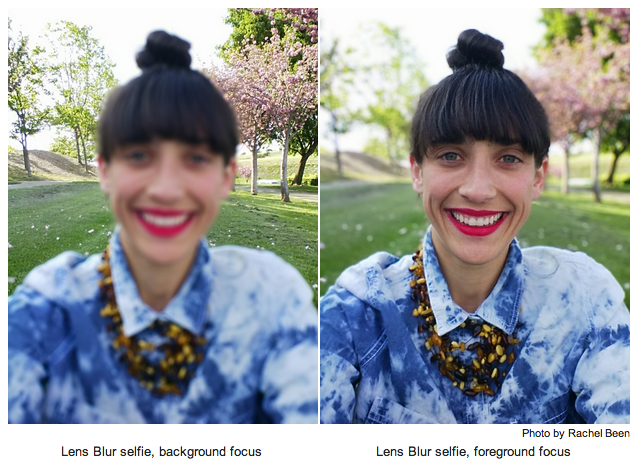
For example, if you look at the left example photo by Rachel Been[1], the hair is blurred together with the distant tree details. If instead the algorithm detected the large depth separation there and applied the foreground blur edge against an alpha mask, I believe the results would look a lot more natural.
Occlusion boundaries are always a challenge for vision algorithms. The defects you see are probably due to incorrect depth estimates in these regions. My guess is that for efficiency on a mobile device, they are using a simple window to aggregate the SAD measurements rather than a more complex term which weights errors based on color similarity. The simpler method will not perform well at these boundaries. Getting correct depth and foreground/background separation is a chicken and egg problem, though there are papers which aim for a joint optimization.
True. This may just be due to inaccuracies in the depth map. And therein lies the problem with synthetic aperture algorithms like this: to make it look (close to) natural, you need very clean depth boundaries. There will always be problems/artifacts when trying to calculate accurate boundaries from something as limited as a few seconds of 2D camera data.
EDIT: Hard to say if this really is a problem with the depth map. In the right image (foreground in focus), the background blur seems to end pretty close to the hair boundary, if not somewhat inside the boundary of hair - the edge of the hair appears slightly blurred. If the depth map were simply inaccurate (with the same inaccuracy applied in both images), I'm guessing you'd see a portion of sharper background outside the hair boundary. I suppose another explanation would be some biased expansion/feathering of the blur mask.
Getting a good alpha channel around objects is pretty hard live and with high megapixel counts. If you want to do this in-camera or within half a second, it's going to be sloppy for now. Essentially you have to check out a bunch of different 'magic wand' settings and compare the results, and there's no validation of those results until the user sees them. But yeah, it should definitely be possible to scoot the blur point "backwards" a bit.
I'd love to see some test images with that (just get a side-by-side with the app and a larger aperture camera).
As I understand what you're proposing, I'm not sure it would actually be closer to what a large-aperture camera would capture. The light field from the farther depth field should be convolving with the light field from the near depth field.
Still, side-by-side would be the best way to view these :) I'll do it later this weekend if I get the chance.
Thanks! Great example. Does it look like the large camera is focusing a few inches back from the front of the ball and the Google Camera is sharpest at the center of the ball?
Edit: I was trying to look at the sharpness of features on the ball -- specifically the lettering on the left side.
Focus point of the large camera should be the exact center of the image. The center of the ball is a little out of focus as the center of the image is the top left of the ball. User Error :)
What do you mean, "the light field from the farther depth should be convolving with the … near"? Intuitively, grandparent post is right, the hair should be sharp.
Nope, in the left example the hair should be blurred even in the edges. But the blur should be such that the details in the background are preserved (it seems sightly off). The math behind this afaik is a variant convolution with depth dependent kernel + occlusion. So in the right the hair is sharp because the blurred background is occluded by the sharp hair, but in the left the frontier isn't sharp because the sharp background isn't occluding the blurry foreground.
You'll notice that on the bottom image, even though the foreground leaves are out of focus, the blur does not apply to the background - details in the background are still sharp, even if partially occluded by the foreground blur.
Actually I would say it is a hard problem. Look at anything filmed in a studio against a blue/green screen. This is with perfect lighting, a perfectly racked camera, a proper camera tripod/dolly, a perfectly even background screen, the presenter wearing safe colours and anything else I forgot to mention controlled. Now look at the fine hair detail. Does it resolve too well in front of the keyed in <weathermap>?
Probably not. You need a very highly skilled operator to get the fine hair detail right. Hollywood can afford the pros, a regional news station in Papua New Guinea maybe not so.
I would not say fine hair detail is out of the question, however, we might have to live without it when using this faux depth affect for now.
It doesn't seem to be the same league of problem. Because you are going to blur the stuff in the background anyway, you can be agressive with the masking and the blurring will make it imperceptible. With blue/green screens you are making changes much more severe than just blurring (in terms of the colors, hues and shades involved).
Source: Hardly an expert, but I am quite a photography geek, and I've done some work on this type of graphical algorithms in the past (not this type of fancy 3D stuff though).
Is the app taking more than one photo? It wasn't clear in the blog post.
AFAIU to have any depth perception you need to take more than one photo. Calculate the pupil distance (the distance the phone moved) then match image features between the two or more images. Calculate the amount of movement between the matching features to then calculate the depth.
As described you then map the depth into an alpha transparency and then apply the blurred image with various blur strength over the original image.
Since you're able to apply the blur after the image, it would mean the google camera always takes more than one photo.
Also a Cool feature would be to animate the transition from no blur to DOF blur as a short clip or use the depth perception to apply different effect than just blur, like selective coloring, or other filters.
I just used it, it seems to use the movement to calculate the depth, but the initial image is not blurred or mutated in any way other than how it has calculated the depth.
Using the app it feels like it knows how much you are moving it, which would indicate it's not taking more 'pictures' but actually building a depth map for the first image it takes.
I sure wish you could buy a DSLR that just plugs into your iPhone. I don't want any of that terrible DSLR software -- just the hardware.
I think many devices should become BYOD (bring your own device) soon, including big things like cars.
edit: I don't just want my pictures to be saved on my phone. I'd like the phone to have full control of the camera's features -- so I can use apps (like timelapse, hdr, etc.) directly within the camera.
None of these solutions are perfect, but just fyi:
1) Samsung has released the Galaxy NX: a mirrorless interchangeable lens camera, which has a DSLR-sized APS-C sensor, but no actual mirror. The back is essentially just a big Android phone.
2) Sony sells the QX-10 and QX-100, which are just the lens, and you wirelessly connect them to your phone. The QX-100 has the same 1" sensor as the best pocket camera you can currently buy (the RX100).
3) Both Sony and Canon make wireless cameras (Canon 6D [full-frame], Sony RX100 MII [1" sensor] or A7/A7R [full-frame], maybe others), that let you connect to a phone or tablet and view a live feed of what the camera sees, change the aperture or other settings, trigger the shutter, and receive photos on your device. I'm unclear how open the Canon API is, but Sony has their own ecosystem of interesting apps (http://playmemoriesonline.com/) that let you do things like set-up time lapses. The Sony UI is pretty clunkly though, I would greatly prefer an open API.
I'm interested why you'd want DSLR, though, because if it attaches to my phone i'd probably be happy to use the phone screen as the viewfinder and save the depth and weight that would otherwise go to a moving mirror assembly.
I recently got a Canon 6D. It has built-in wireless which allows you to connect directly to your smartphone so you can download photos from the camera to your phone. It works really well. You can also use your phone as a remote control to take photos and the view finder can be seen on your phone. I love that camera.
I believe the Canon 70D does this too (which is not a full frame like the 6D, but a APS-C cropped frame), as well as some of the Panasonic m4/3 (micro-four-thirds) cameras like the GH3/GH4 and GX7.
Creates a hotspot that your iPhone can connect to. Photos are then immeidately moved to your device as they are saved to the SD card by the camera.
I havent tried it, but Ive heard it works well for quickly sharing pictures. Downsides are cost compared to normal SD cards and battery use by your device.
I have tried it. In the default configuration, it tries to upload all photos online whenever it finds itself in the known WiFi network. I didn't like this.
Direct transfer to other devices is possible, but the configuration UI is horrible. I spent half a day to configure it. Did I tell it doesn't work in Linux? Bottom line: I managed to be able to browse the contents of the card from the Windows PC, and much slower than if I inserted it in the card reader.
On the go, EyeFi is almost useless. The best configuration that worked for me (without synchronizing everything, but uploading only selected shots and only to the phone) was with phone providing a WiFi hotspot. And it eats the battery pretty fast. WiFi connection attempts take forever. I had to prevent the camera from sleeping too. Transfering huge DSLR files to the phone was always an overkill.
On the scale of 1 to 10, I'd give EyeFi usability a solid 3. It kind of works, but it didn't solve my problem.
Worst of all, some files were not saved properly (they remained 0 bytes). It happened at random, but regularly. Afterall, I retired the EyeFi card and switched back to normal SD cards which are faster and much more reliable.
But the scenario you seem to lust for (a combination of high quality DSLR hardware and a competitive app market) will never manifest because the hardware is too fragmented. There never will be standard interfaces, and you won't get enough competition to develop the greatest possible camera app for a specific hardware model.
I did a quick comparison of a full frame slr vs moto x with this lens blur effect. I tried to match the blur amount, but made no other adjustments. Work really well compared to everything else I have seen!
http://onionpants.s3.amazonaws.com/IMG_0455.jpg
It doesn't give me a headache, but to my eyes it isn't remotely convincing. There's no way I'd look at any of those example pictures and not realize the blurring was done with postprocessing.
The blur is far too uniform and boring. Actual bokeh has more intrigue to it: lens aberrations, crazy highlights, wonderful patterns, even when the depth of field isn't very extreme.
I agree with bronson about the uniformity of the blur. Also, the amount of blurring doesn't change enough as the distance changes. It's better than previous techniques that have just blurred the entire background the same amount, but it still doesn't feel right. That's understandable; it's an incredibly hard problem to figure out how far away everything in the image is, and blur it the appropriate amount. I'm impressed by how well they've done so far. But there's definitely still work to be done.
I agree that it irks me. But I find that irritation hard to justify: Shallow depth of field is artificial in all cases. Your vision doesn't really work that way. Even saying "Your eye is like a camera" is only partly true. You can't get at the unprocessed image. What you think you see isn't the image on your retina.
So saying that the effect as a result of a wide-open aperture is more truthful than algorithmically blurring the background of a photo seems odd. Both are a photographic artifice that approximates what you think you see when your attention is on one object in your field of view.
The same is true for the effects of focal length. A longer lens approximates, but can never actually reproduce, the effect of the brain trying to make same-sized things look the same size. A shorter focal length does the opposite, and puts more emphasis on foreground objects.
I do not understand what you mean by "Shallow depth of field is artificial in all cases. Your vision doesn't really work that way." If I hold my hand very close and focus on it, the background obviously becomes blurred.
Your eye has long-ish depth of field. Your brain also compensates for focus. So you perceive an in-focus area several inches to many feet deep.
With an f1.2 lens, I can put objects just a few millimeters in the foreground and background of a subject out of focus.
Photographers, consciously or otherwise, use a language of optics effects to suggest ways of seeing, but they never work the same way as your vision system, which also lacks the ability to introspectively show you the raw data from your eye. So the saying that "your eye is a camera" is true, but the camera image is not directly accessible to your own mind.
So, somewhat ironically, this faux DoF effect might work more like your eye, putting a whole foreground object in sharp focus, and making the background uniformly "blurry."
It doesn't look that realistic, but it's way better than the awful tilt-shift effect (or whatever it's called) on instagram. Which, as far as I can tell from my facebook feed, is used 99% of the time as a poor man's bokeh.
Any form of blurriness can have this effect - I presume your eyes are interpreting the blurriness as something not being in focus, and are repeatedly trying to focus, causing strain. (I first observed this effect when watching someone playing World of Warcraft, when their character got drunk it made the whole screen blurry and gave me a headache)
Yes, it's definitely causing me discomfort to look at them. I see the blurred area, and try and fail to focus on it. 3D effects really don't translate well to a 2D display. I get what they're going for, but I'm personally not a fan of the effect. I'd rather have the nuanced little details in the background, in case one day I want to see that too. The effect is lovely for extreme close-up pictures (of insects, flowers, water drops, ...), though.
I like the idea of storing the depth information (and preferred focal point) inside the image, and allowing the viewer to decide whether they want depth of focus effects, and if so, how strongly they want them enabled.
The difference is that Lytro actually does it, instead of simulating it.
It'd be fun to play around with the software to see in which cases it breaks (perhaps taking a photo of a framed landscape photo with another landscape behind, for example)
Lytro is also "just" simulating it, but with slightly more/different data. They capture a light field but that doesn't magically give them depth values; they have to estimate them using an optimization, and then render the final image using a very similar algorithm.
In reality the Lytro has abysmal performance, which questions the value of lightfield technology as a whole.
Instead of capturing the 'light field' you may as well capture most of the image.
Secondly the loss of the 2nd derivative of the k-vector makes lightfield currently unsuitable for use in a microscope (although they are working on it...). Although there might be better techniques for refocusing, such as division in the spatial frequency domain.
Doesn't look totally convincing, but it's good for a first version.
The real problem with things like this is the effect became cool by virtue of the fact it needed dedicated equipment. Take that away and the desire people will have to apply the effect will be greatly diminished.
Wow.. this is missing the entire point on why lens blur occurs. Lens blur in normal photographs is the price you pay because you want to focus sharply on a subject. The reason photos with blur looks "cool" is not because the blur itself but its because the subject is so sharply focused that its details are order of magnitude better. If you take a random photo, calculate depth map somehow, blur our everything but the subject then you are taking away information from the photo without adding information to the subject. The photos would look "odd" to the trained eyes at best. For casual photograph, it may look slightly cool on small screens like phone because of relatively increased perceived focus on subject but it's fooling eyes of casual person. If they want to really do it (i.e. add more details to subject) then they should use multiple frames to increase resolution of the photograph. There is a lot of research being done on that. Subtracting details from background without adding details to subject is like doing an Instagram. It may be cool to teens but professional photographers know it's a bad taste.
> Subtracting details from background without adding details to subject ...
Not sure what you mean by this. Blur is only due to focus distances and aperture sizes. Making the depth of field narrower (making the OOF regions more blurry) does not add detail to the areas that are in focus. Usually, it's even the other way around.
Example:
Say we shoot a portrait of a person at 5m with a forest 30m away in the background, at 3 different apertures: f/1.4, f./11 and f/20
At the largest aperture (f/1.4) the background will be completely out of focus and the face of the subject will have sharpness at "80%" of what my lens/sensor combo can do in terms of resolution. The less-than-excellent subject sharpness is because lenses aren't perfect and using the largest aperture will reveal this. Even if you use an expensive professional lens, it will have it's maximum sharpness at some aperture that is smaller than the largest. What does happen in the shallow DOF shot is that we have a form of perceived sharpness (usually referred to as "pop") which is an effect that is simply due to the fact that the subject is so distinct from the background.
At f/11 the subject sharpness is better than at f/4. It is now probably near 100% of the maximum resolution the sensor/lens combination can deliver. The background is significantly more discernible/focused now. If it was a green blur in the f/1.4 shot is now a forest of very slightly blurred trees.
At f/20 the subject's sharpness is again less (e.g. 90%), this time due to the physical limitation known as diffraction that occurs for very small apertures compared to the wavelength. This shot has completely focused trees in the background.
To put it another way: when you take the f/11 portrait and go to f/1.4 you take away almost ALL of the background information, and SOME of the foreground information, while adding NO new information.
The entire shot will be less focused when you do.
But there are still advantages. With a larger aperture the sensor/film is receiving more light which means the shutter speed can be increased. If the subject isn't perfectly still this can result in decreased blurriness. It's been a while since my HS photography class but I think that's correct.
That is not true. Stopping down the lens aperture increases the depth of field without reducing detail in the focal plane, until the diffraction limit (around f/16 for a 50mm lens on a full frame DSLR).
These algorithms can allow you to have a self-driving car with only cameras. But, there would be a lot of problems if you tried to make a camera-only system for consumer vehicle navigation. Vision systems need distinct "features" in images to find and track across frames to allow you to compute distance, speed, etc. If you don't have many features, pure vision approaches won't work. Nighttime operation is a big problem, as is driving on relatively smooth, featureless terrain.
The basic downside is that standard consumer cameras are passive devices. That's why Google uses LIDAR- it's an "active" technology that creates its own features. And driving is an application where the usual computer vision "it works most of the time" is just not good enough. Time of flight cameras are interesting sensors that combines active with passive technology. As this technology matures it might allow for self-driving cars without LIDAR.
Thanks for that explanation. I have been thinking of experimenting with automated driving with cameras and got encouraged by things like these: https://www.youtube.com/watch?v=dcm9NpMNi68 . But yeah, I can understand how ideal conditions are very different from the real world.
Yes. Machine vision has advanced a lot in recent years and it might just be possible. There is at least one startup trying to make self-driving cars with just machine vision.
Computing the differences between several cameras can be a judge of distance, but you can also see how much the object moves as the car moves, and get an estimate based on normal machine vision (how big objects like that normally are, objects nearby it, where it's shadow is, etc.)
Do you happen to remember the name of this startup?
I have been thinking of experimenting with automated driving. Have started reading up on computer vision and found some encouragement from things like these: https://www.youtube.com/watch?v=dcm9NpMNi68
In the future maybe. Computing the depth maps in this simple case is not very costly because it only requires a relatively sparse amount of key points. To recreate the full scene geometry around a car while moving at 100kmph is a lot harder. Not only do you need to use a massive amount of key points but you need to produce a depth map in millisecond time frames.
A couple of other really cool depth-map implementations:
1) The Seene app (iOS app store, free), which creates a depth map and a pseudo-3d model of an environment from a "sweep" of images similar to the image acquisition in the article
2) Google Maps Photo Tours feature (available in areas where lots of touristy photos are taken). This does basically the same as the above but using crowdsourced images from the public.
IMO the latter is the most impressive depth-mapping feat I've seen: the source images are amateur photography from the general public, so they are randomly oriented (and without any gyroscope orientation data!), and uncalibrated for things like exposure, white balance, etc. Seems pretty amazing that Google have managed to make depth maps from that image set.
I find it funny that this was one of the "exclusive features" of the HTC One M8 thanks to the double camera, and days after it's release Google is giving the same ability to every Android phones.
I'm sure the HTC implementation works better, but this is still impressive.
The interesting part is not that it can blur a part of the image. The interesting part is that it can generate a depth map automatically from a series of images taken from different points of view, using techniques used in photogrammetry.
This app is now on the Play Store and works with most phones and tablets running Android 4.4 KitKat. Unfortunately it seems to crash on my S3 running CM 11, but your experience may vary.
The Lytro images have a lot more data in them (although probably fewer pixels). You can move around slightly in a Lytro photo because it samples light from all directions. Also, Google's version doesn't seem to use the multiple exposures in the final photo. It only uses them to determine which pixels to blur in the first photo, and uses normal gaussian blur instead of simulating a lens.
This doesn't capture the whole light field, which is the advantage of a light field camera. Changing the focus is just a fun application if you have access to the whole light field.
http://en.wikipedia.org/wiki/Light_field
Lately I've been watching various TV shows that are using green screen/composite effects. At times, I felt there was some kind of weird DOF thing going on that just didn't look right.
Now I know what that is. Computational DOF. Interesting.
Along these lines, wasn't there a camera technology that came out last year that allowed total focus/DOF changes post-image-capture? It looked awesome, but IIRC, the tech was going to be several years until released.
ADD: Here it is. Would love to see this in stereo 4K: http://en.wikipedia.org/wiki/Lytro The nice thing about this tech is that in stereo, you should be able to eliminate the eyeball-focus strain that drives users crazy.
It's interesting that the DoF is calculated in the app. I am wondering if this uses some known coefficients about smartphone cameras to save computation, but in any case I hope this depth mapping becomes available in plugin forms for Photoshop and other users.
As an indie filmmaker, it would save a lot of hassle to be able to shoot at infinity focus all the time and apply bokeh afterwards; of course an algorithmic version would likely never get close to what you can achieve with quality optics, but many situations where image quality is 'good enough' for artistic purposes (eg shooting with a video-capable DSLR) then faster is better.
I've created a parallax viewer for lens blur photos. It's an open source web app available at http://depthy.stamina.pl/ . It lets you extract the depthmap, works on chrome with webgl and looks pretty awesome on some photos.
There is quite a few things you can do with this kind of images, so feel free to play around with the source code on github https://github.com/panrafal/depthy
Refocus is awesome and I owe many but not as powerful as this at all - Refocus takes like 10 photos at different levels of focus, so you're limited to the amount of bokeh that the small phone sensor can produce, i.e you only get a nice blurred background when you're taking a really close up picture of something. The new Google Camera feature lets you take a portrait at a normal distance, and simulate f1.8, which is a lot better than what Refocus can do.
I'd like to see an example of a evening/night shot using this. I can't imagine the results are anything like the examples here, but would love to be surprised.
On iOS you can customize your DoF with an app called Big Lens.
Normally apps like Instagram and Fotor let you pick one point in the picture or a vertical/horizontal segment and apply focus there while blurring the background. Big Lens is more advanced since it lets you draw with your finger what you'd like to be in focus.
They also include various apertures you can set (as low as f/1.8) as well as some filters -- although I personally find the filters to be overdone but others might find them tasteful.
Happy for this "invention" but I would wait for this kind of stuff when smartphones will have all their laser sensors for depth measurment, so this calculations doesn't require a sequnce of taken picture, as the main character could move quickly and deform the final picture or the blur effect. But for static photography or selfies looks amazing.
I may be wrong because I don't know much about image based algorithms, but this seems to be a pretty successful new approach to achieving this effect. Are there any other existing "lens blur" or depth of field tricks that phone makers or apps are using?
SynthCam is one, free but not open source. You might be interested in the various bits of lightfield rendering code released by Stanford: http://lightfield.stanford.edu/
Synthetic aperture-like algorithms are also common at SIGGRAPH if you go through the past two decades.
A quick search didn't unearth any, but there is open source software to do parallax depth inferencing, and you could just apply proportional gaussian blur kernels to each depth segment to get a very similar effect.
The novelty I see here, is the combination and integration into an app. Creating blurred images from a photograph and its depth map can be achieved with a GIMP plugin since at least 2008 [1]. Combining a series of photos to create a 3D model is also widely implemented, e.g. in the Photosynth application developed at U Washington/Microsoft which according to Wikipedia exists as a tech preview since 2006.
Super, this is exactly what I was wondering - whether they really had done something brand new or just put it into an app that lets you choose the blur point yourself after.
Well, the only "new approach" I can see here is letting the user decide which part of image should be sharp. BlessN900 camera app for Nokia N900 was doing exactly what this new app does few years ago, but it was choosing the focus point automatically.
So, is there a way to get the depth map out of the image separately for more post-processing?
Fake DOF is nice, but there are a lot more fun things you can use a depth map for. For example, it seems like ghetto photogrammetry (turning photographs into 3D objects) wouldn't be too far away.
This sounds clever but also massively complex for what it does. I don't have anything finished but I can think of a few approaches to this without needing to reconstruct 3d things with clever algorithms... still very neat visually if technically underwhelming
Is this related to the point cloud generation feature modern compositing programs use, like Nuke? Example/tutorial video: http://vimeo.com/61463556 (skip to 10:27 for magic)
Neat effect--I'm definitely interested in trying this app. Would be cool to see them go further and try to turn highlights in the out of focus areas into nice octagons or other shapes caused by the the aperature blades in a real camera.
How is Nokia Refocus similar or different to this? It allows refocusing a part of the image which blurs out the rest.(Not a pro)
https://refocus.nokia.com/
Refocus is a set of photos with different focal lengths, and a look up table.
For each "pixel" (The look up table isn't full resolution) the look up table tells which of the photos has the most variance (i.e., is the most focused) at that point, and the viewer simply switches the photo that's shown.
Isn't it interesting how, by diminishing the overall information content of the image by blurring it, it actually communicates more (in some ways, particularly depth) to the viewer?
Well, usually it's for a specific purpose (drawing attention to something) or aesthetic that you use a shallow depth of field. There have been artists in the past that tried to go extreme in the other direction, trying to capture as wide DOF as they could.
Both of these are good individually. But what is best depends totally on what exactly you're going for. Stanley Kubrick did very interesting experimentation with this.
The app is fast on my nexus 5. The lense blur feature is really neat. I've taken some pictures this evening and they have turned out great. Overall a nice improvement.
I think it's more accurate to call bokeh a type of blur. But I still agree with you in that the name Google Lens Bokeh is more accurate, but it sounds worse so...
the accurate depth map creation from 2 photos on a mobile device is impressive. The rest has been done many times before
This is cool, but I am waiting more for RAW images exposed in Android camera API. Will be awesome to do some cutting edge tonemapping on 12bits of dynamic range that the sensor gives, which is currently lost.
Shallow depth of field is so overused these days. I much prefer having the entire frame in focus, and let me decides what to focus on. I understand the photographer is trying to emphasize certain parts of the photo, but in the end it feels too limiting. It's analogues to mobile "optimized" websites - just give me all the content and I'll choose what I want to look at.
I wish google camera gets ported to iOS. The best alternative for iOS seems to bee the "Big Lens" app, where you have to manually create a mask to specify the focused area.
So glad I did the Coursera course on Probabilistic Graphical Models, so I totally have an understanding of how this is done when they mention Markov Random Field...
Looks exactly like "shallow" mode of BlessN900 app for Nokia N900 from few years ago.
It's funny to see how most of the "innovations" in mobile world presented today either by Apple or Google was already implemented on open or semi-open platforms like Openmoko or Maemo few years before. Most of them only as experiments, granted, but still shows what the community is capable of on its own when not putting unnecessary restrictions on it.
If only they had not confused shallow depth of field with Bokeh (which is not the shallowness of the depth of field, but, rather, how out-of-focus areas are rendered), this writeup would have been much better.
I am the author of the Lens Blur blog post and the sentence was indeed wrong as a result of multiple edits. Bokeh and shallow depth of field are indeed two different things. By Bokeh we mean that the blur is synthesized using a disk kernel, e.g. as opposed to a Gaussian Blur. The blog is now fixed.
Compare HTC's bokeh or any other attempt at this vs Google's and you will see that there is definitely a difference in how the out-of-focus areas are rendered.




In that field, digital edits are seriously banned, to the point multiple very well known photo journalists have been fired for one little use of the clone tool [1] and other minor edits.
It's interesting to think I can throw an f/1.8 lens on my DSLR and take a very shallow depth of field photo, which is OK, even though it's not very representative of what my eyes saw. If I take the photo at f/18 then use an app like the one linked, producing extremely similar results, that's banned. Fascinating what's allowed and what's not.
I find even more interesting is the allowance of changing color photos to B/W, or that almost anything that "came straight off the camera" no matter how far it strays from what your eyes saw.
[1] http://www.toledoblade.com/frontpage/2007/04/15/A-basic-rule...