And the amplification circuitry, that's not trivial. I was actually surprised he got away with having the wiring out in the open without shielding it for EMI.
In the section for "Electronics" is this line "I place a metal can over the STM during scanning to shield the tip and preamp. Without the shield, the images produced by the STM are dominated by 60 Hz noise pickup."
> I just cant's wrap my head around the rule of writing every substantive with a capital letter though, which I interpret as an annoying need to always circumstantiate a purported objectivity of the perceived reality.
I think this rule actually exists to make reading german texts easier.
IMO reading german without capitalized nouns is a lot harder, because you don’t recognize nouns on first sight.
> The ~ and \ have moved to the usual location of the Backspace. Working exclusively on UNIX systems now, I don't mind the \ being harder to reach. I could understand a Windows user finding this irritating.
This guy has clearly never used LaTeX.
I mapped my \ to a more accessible location and it improved my typing speed by factor 2 or so.
Is it odd that I've never found my typing speed to be a bottleneck worth optimizing? Maybe I haven't thought about it enough. While I overall type slower than I think, the difference is very slight and the result is more time to think about how to phrase things. I often find my hands freezing for .5ish seconds while my brain get stuck deciding on what the next appropriate word is.
When coding, it is even less of an issue and if I ever have anything to optimize on the level of typing it would be the auto complete not being helpful enough.
Very early in my career, I started to get RSI issues (before it was a well known phenomena). I limited my typing speed to 32 WPM and also enforced a rest every 30 seconds (originally by beeping the speaker every 30 seconds until I got used to it). I now type very slowly while programming, but usually I'm thinking continuously. Often I'm not thinking at all about the thing I'm typing -- the typing is waaay far behind. I'm convinced that this strategy both saved my hands/wrists and improved my coding.
Interestingly, I stream some free software coding I do on twitch (usually about 2 hours a day). I should watch myself and see what I do now, because I haven't really paid attention to my typing for at least a couple of decades. Though, my streaming dialog easily takes half of my brain, so maybe it's not what I normally do... ;-)
I type very very fast, and yet I know I can speak faster. Not all typing is careful crafting, and even to the extent to which it is seeing it printed out and then erasing parts and replacing them is a very effective way to test things out and save state. Most of my typing is just conversing, where typing notably slower than I can speak, as opposed to merely a bit slower, would be crippling. (And even if I am in a situation where I am waiting on someone else, well, then I can type fast enough to talk to two or three people at once.)
I’ve been wanting to config emacs to change my special char layout from major modes to major modes. As such, i could make my backslash key easily accessible from latex-mode, but out of the way in python-mode. Get my backquote easily accessible from lisp-mode, but out of the way in other modes.
I feel like if i only have a few special chars to move around between modes, it should be easy to learn.
I’ve already inherited my xkbmap and changed the special char to something that suites me more and its been better on my fingers.
Also as a vim user I would like the esc instead of the control here but that is non Unix standard as far as I know. I also use Windows quite a lot so having the \ somewhere close is nice to have.
Though I really dislike the meta key next to the space-bar but that is just me not being old enough to have used non IBM compatible keyboards.
As you might have noticed, everybody's preference is different.
There are many ways to rebind caps lock to be escape on press and control when used in combination with another key. Karbiner elements on macos and xcape on Linux come to mind immediately. But some keyboard firmwares are programmable enough to do it themselves too.
However. What I found best as a vim user was to use ^[ as escape. It has the added bonus of actually being faster to process by vim too.
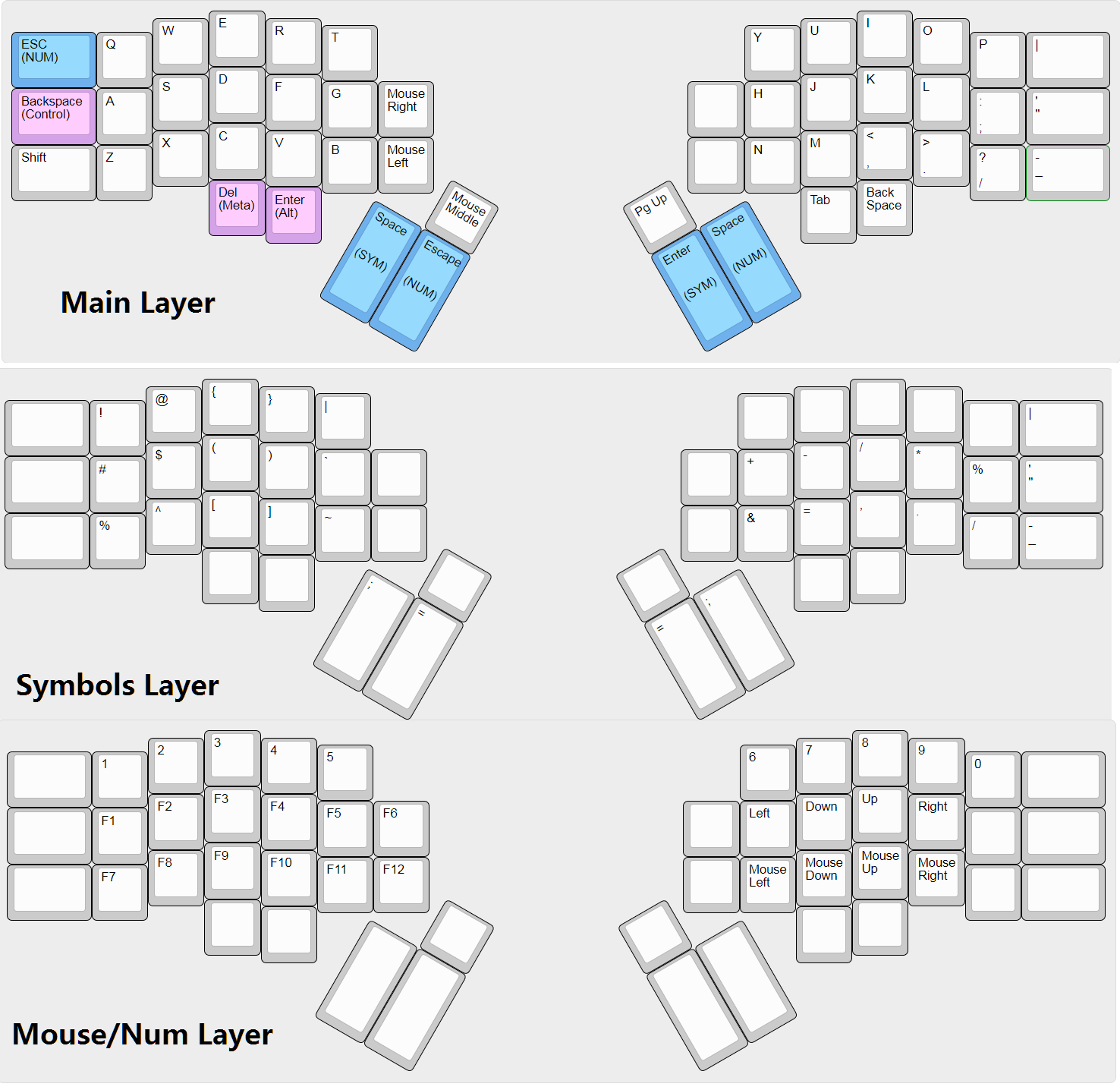
This is why I'm glad that QMK exists. Because you're using a programmable board (where the keymaps/layers/etc) are stored on the keyboard itself you can move everything about and never worry about where your configuration is. And it runs all all sizes of boards from smaller stuff like [1] Gergo and GergoPlex to giant boards like the [2] Hyper7. Hell you can even get a addon board for a HHKB (Hasu Controller) and mod it in.
Although it's a bit of a rabbit hole. You start by moving around your control keys, maybe add a thumb backspace, a few months later you end up with a programming optimized symbols layer [3] and then maybe even adding in chorded stuff [4]. It's a bit of a trip and ruins 'traditional' keyboards.
It's quite funny to see a security checklist "designed to improve your online privacy and security", which has on top of the page a "Share on facebook" button.
Furthermore I find it contradictory that the site uses Google Analytics while encouraging the use of DuckDuckGo.
Do we not want more people to be privacy conscious? Does every facebook user already know all this information? Did Jesus tell his disciples to recede into a private community of solitude and never interact with the unwashed masses of sinners and keep the good news to themselves?
My scepticism isn't against the act of sharing this information. The "share on facebook" button just reminds me of the actual facebook button, which, as included inside the source code, makes facebook collecting data. This is against the idea of "improved privacy" of the checklist.
Yeah, there is no "real" facebook button. Nevertheless one can find a Google Analytics Script inside the source code. IMO this is really sarcastic.